03 Dashboard
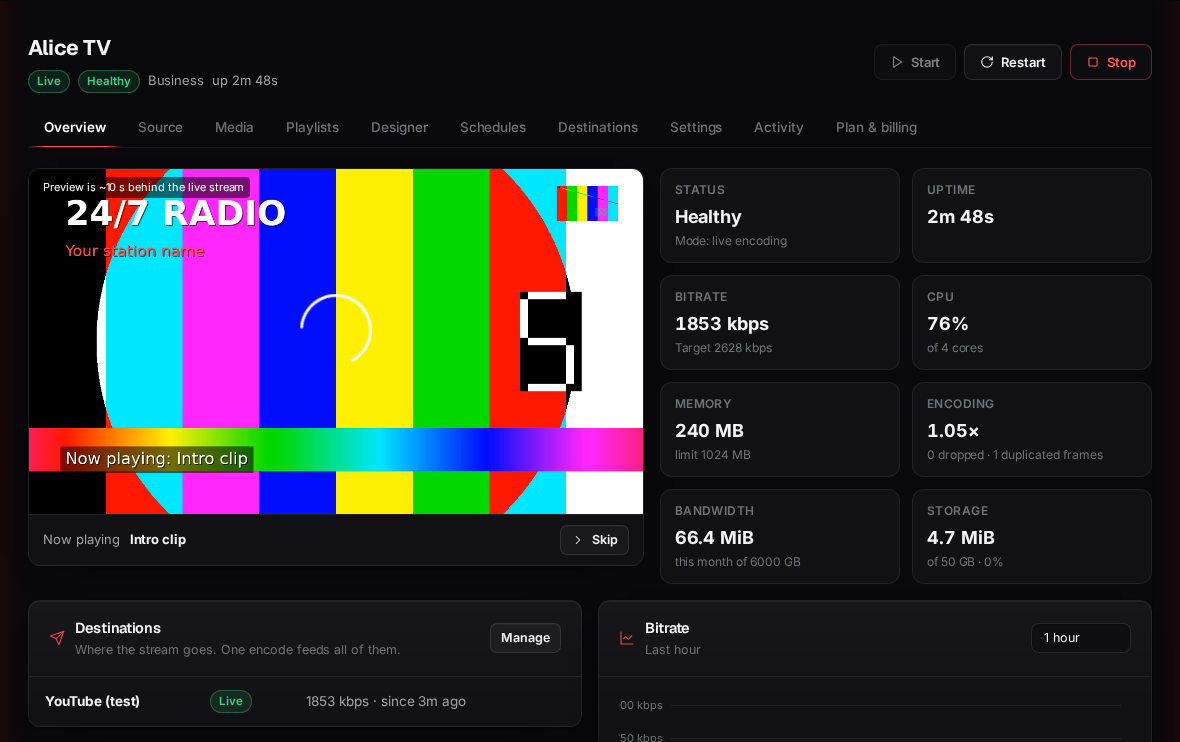
Everything on one screen
Start, stop and restart. A live preview, uptime, bitrate, CPU and memory, dropped frames, bandwidth, storage and each destination's status. These are real screenshots.
Stream to YouTube and Twitch around the clock without keeping your PC running. Powered by NS5 Hosting.
Upload your videos or music once, paste your YouTube or Twitch stream key, press Start. Then shut your computer down: the broadcast keeps going from our cloud, day and night. No OBS, no streaming PC, nothing to install.
One video on repeat forever, like a lofi animation or a channel trailer. Uploads are converted for streaming once, so looping costs nothing extra and the loop point is clean.
Videos back to back, in order or shuffled, repeating. Drag to reorder, add or remove files while you're live: the change starts with the next video, without dropping the stream.
Your music over a picture, slideshow or looping video, with your logo and the current track's name on screen. Made for radio stations, chill streams and ambient channels.
On Business, one stream goes to both platforms together. It's encoded once and sent to each, and if one platform hiccups the other keeps going.
Go live every Friday at 8 PM for three hours, switch to the night playlist at midnight, or start once on launch day. In your own time zone.
Drag text, logos and a "now playing" line onto a preview of your stream. Start from templates: music radio, chill stream, gaming highlights, podcast reruns, community news, TV-style channel, ambient.
Paste the browser source link from StreamElements, Streamlabs or any web page: alert boxes, chat, donation goals, clocks. It's drawn live on the stream with a transparent background, sound included if you want it.
A 24/7 stream needs looking after. We do that automatically, so you don't have to.
If YouTube or Twitch drops the connection, we reconnect by ourselves, backing off politely instead of hammering their servers. Twitch ends broadcasts after 48 hours; we start the next one straight away.
We check that video is really flowing to each platform, not just that a program is open. A stalled encoder is restarted, a broken file is skipped, and a fallback video can fill in.
If a platform keeps refusing your stream key we stop retrying every few seconds, email you, and show exactly which destination needs a new key.
Start, stop and restart. A live preview, uptime, bitrate, CPU and memory, dropped frames, bandwidth, storage and each destination's status. These are real screenshots.
One always-on stream per plan. Billed monthly, cancel any time. Pay by card or with NS5 account credit.
Supported platforms: YouTube Live and Twitch. Kick, Facebook Live and custom RTMP servers are on the way.
Image & music mode: an illustration as the background, 200 tracks on shuffle, the channel logo top-right and "Now playing" at the bottom. Live on YouTube all year.
Playlist mode: new highlight clips dragged into the playlist each week, a corner badge, streaming to YouTube and Twitch at the same time on Business.
Every episode back to back with the episode title on screen, plus a schedule that switches to the newest episode every Monday at 6 PM.
One long rain or fireplace video on loop at 1080p. Uploaded once, never re-encoded, so it runs on the smallest plan's resources.
No. You upload your media in the browser, and the stream runs on our servers. Your computer, phone or anything else can be completely off.
No. Everything happens in the NS5 panel in your browser: uploading, playlists, overlays, schedules and starting the stream.
Just your stream key. On YouTube it's in YouTube Studio → Go live → Stream; on Twitch, Creator Dashboard → Settings → Stream. Your channel must be allowed to live stream on that platform.
Our side runs continuously and reconnects by itself. The platforms have their own rules we can't control: Twitch ends a single broadcast after 48 hours (we reconnect immediately, which starts a new broadcast), YouTube only keeps a replay of the first 12 hours, and either platform can stop a stream that breaks its rules. So we don't promise an unbroken broadcast, but we do everything on our end to keep you live.
Yes, on Pro and Business. Add a "Web page" to your scene in the designer and paste the browser source link they give you. It runs in a real browser on our server, transparent like in OBS, and can include the alert sounds.
Video: MP4, MOV, MKV and WebM. Audio: MP3, WAV, M4A, FLAC and OGG. Images: PNG, JPG and WebP. Large uploads resume if your connection drops. Each file is checked and, if needed, converted once so it streams without re-encoding.
Only if you own them or have permission to broadcast them. Streaming copyrighted content without permission breaks our acceptable use policy and the platforms' rules, and can get both your channel and your NS5 Stream suspended.
Yes, any time from the panel. Upgrades apply right away and you pay the difference for the rest of the month. Cancelling keeps the stream running until the end of the paid month.
If a payment fails your stream keeps running for a few days while you update your card. After that it pauses, and it comes back on its own as soon as the payment goes through.
Think an NS5 Stream channel is broadcasting your content without permission, or breaking the law or platform rules? Tell us. Every report is reviewed by a person.
See our acceptable use policy for what's allowed on NS5 Stream.